A smoother PineConnector experience

The 20 October update expands Edge’s MT5 server selection and refines the parts of Portal you use to check connections, investigate activity and manage your subscription. It builds on the EA settings and broker-symbol controls introduced earlier this month.
More broker-server choices
146 recent server additions are currently selectable in Edge. These are entries added after the broker list in our 6 October update, checked against Portal on 20 October. They include HF Markets and ActivTrades entries, more XM Global and CFI servers, TIO Markets and Windsor Brokers.
A server entry is an exact MT5 connection choice, not a separate broker company. One broker can have several regional, demo and live servers. Here are some of the larger groups of additions:
| Broker group | Recent server additions |
|---|---|
| HF Markets | 58 |
| XM Global | 19 |
| CFI | 13 |
| Windsor Brokers | 8 |
| ActivTrades | 5 |
| TIO Markets | 4 |
| Axi | 1 |
To look for yours, open Edge, select Add Instance and choose a license with an available connection. In Configure Broker, open Broker Server Name and search for your broker. Match the complete server name supplied for your account. Demo and Live labels help distinguish the results.
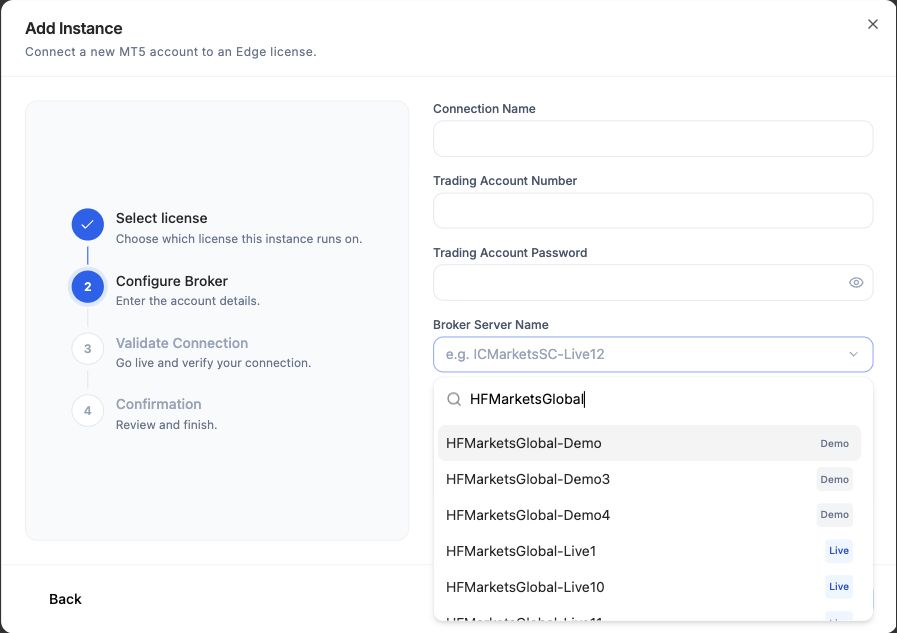
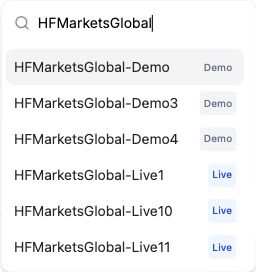
For example, the search now includes HFMarketsGlobal-Demo, HFMarketsGlobal-Live1 and other servers in that family. Select the server for your actual broker account rather than a similar name.
See all 146 recent additions currently listed in Portal
These registry entries were added between 7 and 19 October and were selectable when checked on 20 October 2026. Dates below are registry-added dates. Use the exact, case-sensitive server name shown by your broker.
| MT5 server name | Added to registry |
|---|---|
1xTrade-Server |
19 October 2026 |
ActivTrades-Server |
13 October 2026 |
ActivTradesCorp-Server |
13 October 2026 |
ActivTradesEU-Server |
13 October 2026 |
ActivTradesInt-Server |
13 October 2026 |
ActivTradesMarkets-Server |
13 October 2026 |
AmillexGlobal-Major |
13 October 2026 |
Axi-US54-Live |
19 October 2026 |
AxiaPhoenixFine-MT5 |
19 October 2026 |
Bullfy-Trade |
14 October 2026 |
BullsouqGlobalLimited-Server |
14 October 2026 |
BullWaves-LIVE |
14 October 2026 |
Caibull-Trade |
14 October 2026 |
CFI1-Demo |
8 October 2026 |
CFI1-Real |
8 October 2026 |
CFI12-Demo2 |
8 October 2026 |
CFI12-Real2 |
8 October 2026 |
CFI2-Demo |
13 October 2026 |
CFI2-Real |
13 October 2026 |
CFI2-Real2 |
13 October 2026 |
CFI6-Demo |
13 October 2026 |
CFI6-Real |
13 October 2026 |
CFI7-Demo |
13 October 2026 |
CFI7-Real |
13 October 2026 |
CFI9-Demo |
13 October 2026 |
CFI9-Real |
13 October 2026 |
EmperorIntlBullion-Trade |
14 October 2026 |
FinotiveMarkets-Live |
19 October 2026 |
FirstAsiaMerchants-Live |
14 October 2026 |
FlashCapitalMarkets-Server |
13 October 2026 |
GaitameFinest-Demo |
19 October 2026 |
GaitameFinest-LIVE |
19 October 2026 |
GTioMarketsPty-Demo |
12 October 2026 |
GTioMarketsPty-Live |
12 October 2026 |
HFMarkets-Demo |
8 October 2026 |
HFMarkets-Live1 |
8 October 2026 |
HFMarketsGlobal-Demo |
8 October 2026 |
HFMarketsGlobal-Demo3 |
8 October 2026 |
HFMarketsGlobal-Demo4 |
8 October 2026 |
HFMarketsGlobal-Live1 |
8 October 2026 |
HFMarketsGlobal-Live10 |
8 October 2026 |
HFMarketsGlobal-Live11 |
8 October 2026 |
HFMarketsGlobal-Live12 |
8 October 2026 |
HFMarketsGlobal-Live13 |
8 October 2026 |
HFMarketsGlobal-Live14 |
8 October 2026 |
HFMarketsGlobal-Live15 |
8 October 2026 |
HFMarketsGlobal-Live16 |
8 October 2026 |
HFMarketsGlobal-Live17 |
8 October 2026 |
HFMarketsGlobal-Live18 |
8 October 2026 |
HFMarketsGlobal-Live19 |
8 October 2026 |
HFMarketsGlobal-Live20 |
8 October 2026 |
HFMarketsGlobal-Live3 |
8 October 2026 |
HFMarketsGlobal-Live4 |
8 October 2026 |
HFMarketsGlobal-Live5 |
8 October 2026 |
HFMarketsGlobal-Live7 |
8 October 2026 |
HFMarketsGlobal-Live8 |
8 October 2026 |
HFMarketsGlobal-Live9 |
8 October 2026 |
HFMarketsMENA-Demo2 |
8 October 2026 |
HFMarketsMENA-Live2 |
8 October 2026 |
HFMarketsSA-Demo |
8 October 2026 |
HFMarketsSA-Demo2 |
8 October 2026 |
HFMarketsSA-Live1 |
8 October 2026 |
HFMarketsSA-Live10 |
8 October 2026 |
HFMarketsSA-Live11 |
8 October 2026 |
HFMarketsSA-Live13 |
8 October 2026 |
HFMarketsSA-Live14 |
8 October 2026 |
HFMarketsSA-Live15 |
8 October 2026 |
HFMarketsSA-Live2 |
8 October 2026 |
HFMarketsSA-Live20 |
8 October 2026 |
HFMarketsSA-Live4 |
8 October 2026 |
HFMarketsSA-Live7 |
8 October 2026 |
HFMarketsSA-Live8 |
8 October 2026 |
HFMarketsSC-Demo |
8 October 2026 |
HFMarketsSC-Demo2 |
8 October 2026 |
HFMarketsSC-Live1 |
8 October 2026 |
HFMarketsSC-Live10 |
8 October 2026 |
HFMarketsSC-Live11 |
8 October 2026 |
HFMarketsSC-Live13 |
8 October 2026 |
HFMarketsSC-Live14 |
8 October 2026 |
HFMarketsSC-Live15 |
8 October 2026 |
HFMarketsSC-Live16 |
8 October 2026 |
HFMarketsSC-Live17 |
8 October 2026 |
HFMarketsSC-Live2 |
8 October 2026 |
HFMarketsSC-Live20 |
8 October 2026 |
HFMarketsSC-Live3 |
8 October 2026 |
HFMarketsSC-Live4 |
8 October 2026 |
HFMarketsSC-Live5 |
8 October 2026 |
HFMarketsSC-Live7 |
8 October 2026 |
HFMarketsSC-Live8 |
8 October 2026 |
HFMarketsSC-Live9 |
8 October 2026 |
HFMarketsUK-Demo2 |
8 October 2026 |
HFMarketsUK-Live2 |
8 October 2026 |
iBullCapital-Demo |
14 October 2026 |
iBullCapital-Live |
14 October 2026 |
iFourXCapital-Live |
19 October 2026 |
KVBPrimeLimited-Real |
7 October 2026 |
LHFXSA-Trade |
8 October 2026 |
Millance-Server |
13 October 2026 |
MillionGoods-Server |
13 October 2026 |
MingTakInternational-Server |
8 October 2026 |
MOTCapital-Demo-1 |
12 October 2026 |
MOTCapital-Live-1 |
12 October 2026 |
NewBillionFinancial-Live |
14 October 2026 |
NewspingsCapital-Server |
7 October 2026 |
NewsSecurities-Live |
7 October 2026 |
PDMBulls-Server |
14 October 2026 |
PineXCapital-Server |
19 October 2026 |
Starbull-Server |
14 October 2026 |
TheConcept-Trade |
13 October 2026 |
TIOMarkets-Demo1 |
12 October 2026 |
TIOMarkets-Live1 |
12 October 2026 |
TIOMarketsUK-Demo1 |
12 October 2026 |
TIOMarketsUK-Live1 |
12 October 2026 |
TopOneTrader-MT5 |
7 October 2026 |
TradeTwentyFour7-Server |
19 October 2026 |
UbuntuWeSizwe-Live |
19 October 2026 |
UpWayMT5-Server |
14 October 2026 |
WindsorBrokers1-Demo |
14 October 2026 |
WindsorBrokers1-Real1 |
14 October 2026 |
WindsorBrokers2-Demo |
14 October 2026 |
WindsorBrokers2-Real1 |
14 October 2026 |
WindsorBrokers3-Demo |
14 October 2026 |
WindsorBrokers3-Real1 |
14 October 2026 |
WindsorBrokers4-Demo |
14 October 2026 |
WindsorBrokers4-Real1 |
14 October 2026 |
Winprofx-Live |
14 October 2026 |
XMGlobal-MT5 19 |
12 October 2026 |
XMGlobal-MT5 20 |
12 October 2026 |
XMGlobalBVI-MT5 10 |
12 October 2026 |
XMGlobalBVI-MT5 16 |
12 October 2026 |
XMGlobalBVI-MT5 18 |
12 October 2026 |
XMGlobalBVI-MT5 2 |
12 October 2026 |
XMGlobalBVI-MT5 4 |
12 October 2026 |
XMGlobalBVI-MT5 9 |
12 October 2026 |
XMGlobalKE-MT5 16 |
12 October 2026 |
XMGlobalKE-MT5 2 |
12 October 2026 |
XMGlobalKE-MT5 4 |
12 October 2026 |
XMGlobalMU-MT5 |
12 October 2026 |
XMGlobalMU-MT5 2 |
12 October 2026 |
XMGlobalMU-MT5 4 |
12 October 2026 |
XMGlobalMU-MT5 6 |
12 October 2026 |
XMGlobalSC-MT5 16 |
12 October 2026 |
XMGlobalSC-MT5 4 |
12 October 2026 |
XMGlobalSC-MT5 5 |
12 October 2026 |
XMGlobalSC-MT5 6 |
12 October 2026 |
YLGBullionFutures-Online |
14 October 2026 |
Search the full MT5 broker-server registry, including added dates and entries that are not currently offered in Portal. Current availability is determined by Portal’s selector. A listing does not establish that a prop firm permits every automated strategy; check the rules for your account.
Clearer connection status after a network interruption
When an EA reconnects, Portal updates its registration straight away. A late disconnect message from the previous connection no longer overrides that new registration. This makes the status more useful when you are checking whether your setup has returned after a network interruption.
Check the intended account in Connections, then use recent terminal activity to investigate a particular alert. A connected label alone does not confirm that a broker trade completed.
Test feedback that tells you what to check next
Send Test Signal on Edge now reports an unconfirmed result if it cannot confirm the request within 15 seconds, instead of leaving the control waiting indefinitely. If you switch instances while a reply is delayed, the later response remains associated with the instance that received the request.
An unconfirmed result does not mean the request failed. Check Experts, Journal and the intended broker account’s positions and history before sending again. A repeated test that requests an order could create a duplicate trade. Use a demo account for setup verification.
Follow the connection and demo-trade verification guide.
Cleaner Experts and Journal logs
Edge now filters routine MetaTrader update notices and internal service messages from the log view. This leaves less clutter around the EA and terminal activity you are trying to investigate.
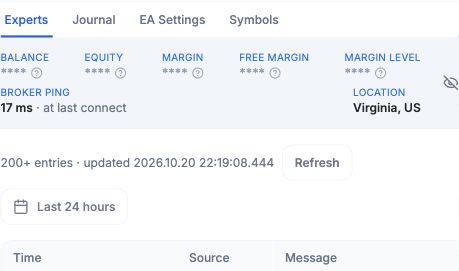
Open Edge, select your instance, then choose Experts or Journal. Choose the event’s date and select Refresh. Experts shows the EA’s activity; Journal records the terminal’s connection and trading messages. Read them together and check the broker account for the outcome.
Smoother checkout and subscription management
We’ve refined the steps around choosing and changing a plan:
- Checkout on iPhone: if Safari blocks a new tab, checkout can open in the same tab.
- Clearer upgrade progress: an upgrade started from the higher-tier window shows progress while the plan is being applied, with the action locked while that request is underway.
- Continue an existing checkout: choosing the same plan again reopens the checkout already in progress.
Subscription information is clearer too. Members moving from a legacy plan to Edge can see their first payment date in their local time zone. Where no payment is due immediately, the Nothing to pay until banner keeps that date visible. Accounts without an active plan have a clearer status, and payment-method errors provide a useful next step.
Review your subscription in Portal.
Improved handling of larger trading histories
This release improves larger trade-history uploads to Analytics, addressing cases where balance movements appeared but the trades did not. Check the account’s Last Updated time before interpreting a blank or incomplete view.
Confirm the intended account is connected with Analytics enabled, allow the initial import to finish, then use Refresh. If older trades remain missing, share the EA version, missing period and last-updated time with Support. Do not restart a trading terminal solely to refresh a chart.
Thank you for continuing to share your feedback. It helps us focus on the details that make PineConnector more useful day to day.