Annual plans, all Bridge features on Core and extra Edge terminals

Annual plans and the 2026 Black Friday offer
Normal annual billing costs 25% less than twelve monthly payments. During our Black Friday and Cyber Monday offer, eligible annual purchases receive 35% off that monthly baseline for the first year.
| Plan | BFCM first year (US$) |
Annual renewal (US$) |
|---|---|---|
| Core | 460.20 | 531 |
| Plus | 1,006.20 | 1,161 |
| Pro | 1,552.20 | 1,791 |
The comparison uses the monthly prices of US$59 for Core, US$129 for Plus and US$199 for Pro. The discounts do not stack. Renewals use the normal annual prices in the table, not the first-year sale prices.
The offer is available from this release through 30 November 2026 at 11:59 PM UTC, which is 1 December at 7:59 AM Singapore time. Choose Annual on Subscription or Get Edge. Existing monthly members can review Switch to annual in Portal.
Before confirming a plan change, check the amount due today, start date and renewal price. Lower-tier changes and legacy migrations can have different terms. A migration that converts unused value into additional days should not be read as an ordinary first-year purchase. The subscription and billing guide explains what to check.
Every Bridge feature is now on Core
Paid Core now includes Signal Authentication, Symbol Mapping, Telegram notifications, Signal Error and Connection Lost tasks. If Core already covers the number of connections you need, you can now use these controls without moving to a higher plan.
Check incoming alerts with Signal Authentication
Your License ID identifies where an alert should go. Signal Authentication adds a separate check: the alert message must contain a secret= value that matches the secret key saved in Portal. When authentication is enabled, a missing or incorrect key prevents that signal from being forwarded to MetaTrader.
Configure it under Bridge → Modifier → Signal Authentication. Prepare every affected alert with the matching key before switching authentication on; changing the Portal setting does not update your existing TradingView alerts. Follow the Signal Authentication guide for setup and verification.
Match your broker's instrument names with Symbol Mapping
TradingView and your broker may use different names for the same market. Your alert might send EURUSD, while the receiving account requires i.EURUSD.micro. Symbol Mapping translates the incoming name before the signal reaches the terminal, so you can keep the original name in your alert.
Add the rule under Bridge → Modifier → Symbol Mapping, using the exact, case-sensitive symbol from your broker account. A mapping changes the name; check the instrument's contract and trading conditions separately. If several broker accounts share one License ID, check the mapping against each account. The Symbol Mapping guide explains how to find the right symbol and test the result.
Receive task notifications in Telegram
Core now supports Telegram delivery alongside email. Link your Telegram account in Tasks + Notifications, then select Telegram in the relevant task's delivery settings. Linking the account and enabling delivery for a task are separate steps.
- Signal Error notifies you when a processed signal encounters an error, so you can inspect the matching log entry.
- Connection Lost notifies you when an account's connection to PineConnector is lost, so you can investigate the connection.
These tasks report a problem; they do not reconnect the account or resend a trade. Check the Signal Log and the intended broker account before deciding what to do next. Start with Telegram setup and the Tasks guide.
Choose one active task on Core
Core can use any of the four task types: Close All Trades, Trading Time Limit, Signal Error or Connection Lost. Its allowance remains one active task at a time. For example, you cannot keep Connection Lost and Trading Time Limit switched on together on Core. Telegram is a delivery channel for a task and does not use another active-task slot.
Plus allows three active tasks and Pro allows unlimited active tasks. Connection and hosted-terminal allowances remain as listed below, and legacy-plan rules stay separate. Saved secret-key and Symbol Mapping settings are retained through payments.
Add hosting within your existing connection allowance
On paid monthly Core, Plus and Pro, each extra hosted MT5 terminal costs US$35/month. Open Subscription → Extra Edge terminals → Add terminals, or use the purchase route from Add Instance on Edge. Review today's prorated quote and the recurring total before confirming. Removing an add-on takes effect at your next renewal.
| Plan | Total trading connections |
Edge hosting included |
|---|---|---|
| Core | 3 | 1 terminal |
| Plus | 10 | 3 terminals |
| Pro | 25 | 5 terminals |
Extra hosting does not add connection slots. Included and extra hosted terminals together cannot exceed your plan's connection allowance. For example, Plus with one extra terminal can host 4 of its 10 connections on Edge. While all four are in use, up to six can run on your own PC or VPS.
Extra hosted terminals are available only on monthly Core, Plus and Pro. See adding and removing Edge hosting for the steps and checks.
Clearer payments and bank approval
Failed renewals now show Payment failed, the amount owed, the next retry date and attempts made. Pay now accepts a replacement card and attempts payment immediately. Cancellation is available to stop further charge attempts, and ended plans show the reason. The payment recovery guide explains the checks to make afterwards.
India-issued cards stay on file through renewals and plan changes. When your bank needs approval for a renewal, upgrade or an earlier affected payment, a Portal banner opens the approval flow. This includes the fix for India-issued cards that could not upgrade after buying Core. Complete the bank's flow, then check the payment status in Portal.
A refreshed Subscription page and mobile menu
The three plan cards now show a price per connection per day, with a Compare plans table for features and allowances. These daily figures help with comparison; billing remains monthly or annual.
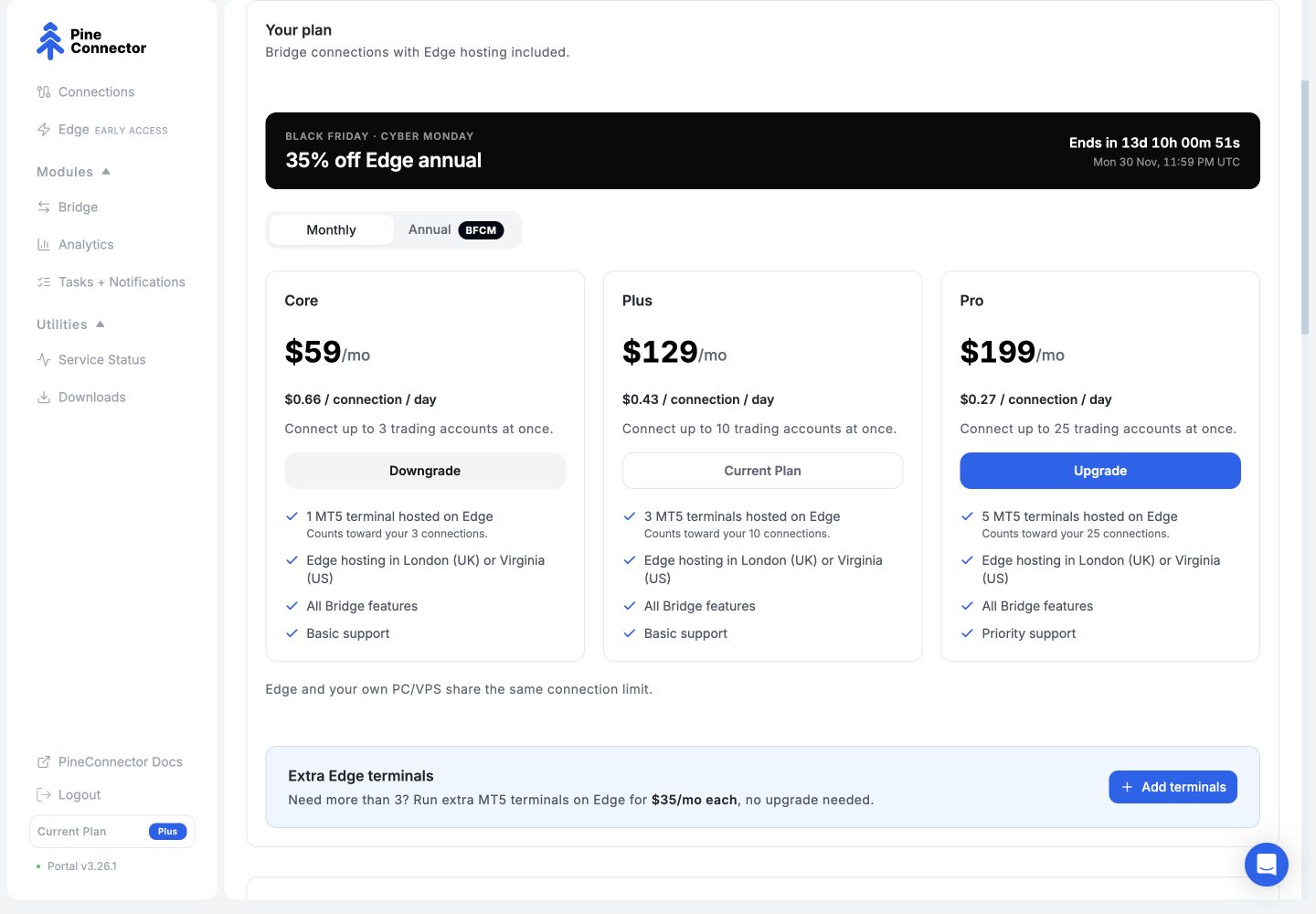
On narrow screens, the sidebar becomes a top bar with a full-screen menu. We also fixed the brief extra-instance notice that could appear in the switch-subscription window when an account had no extra instances.
Open Subscription in Portal to review the options for your account.